
简体中文
继承
VuePress 经典主题有着大量的用户,因此我们对它进行了一些便于继承的设计,以便用户轻松进行定制化。
布局插槽
经典主题的 Layout 布局提供了一些插槽:
navbarnavbar-beforenavbar-aftersidebarsidebar-topsidebar-bottompagepage-toppage-bottompage-content-toppage-content-bottom
在它们的帮助下,你可以很容易地添加或替换内容。下面通过一个示例来介绍一下如何使用布局插槽来继承经典主题。
创建一个客户端配置文件和一个本地布局,并在前者中注册该布局:
.vuepress
client.ts
Layout.vue
import { defineClientConfig } from 'vuepress/client'

import Layout from './layouts/Layout.vue'

export default defineClientConfig({
  layouts: {
    Layout,
  },
})<script setup>
import ParentLayout from '@vuepress/theme-classic/layouts/Layout.vue'
</script>
<template>
<ParentLayout>
<template #page-bottom>
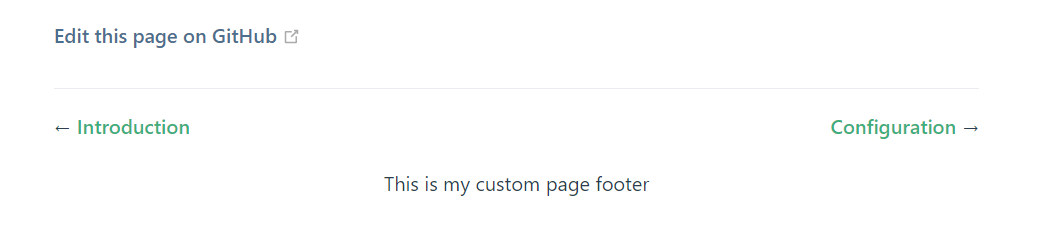
<div class="my-footer">This is my custom page footer</div>
</template>
</ParentLayout>
</template>
<style lang="css">
.my-footer {
text-align: center;
}
</style>此时默认的 Layout 布局已经被你的本地布局覆盖,将会在除了首页外的所有页面添加一个自定义的页脚:
组件替换
布局插槽十分实用,但有时候你可能会觉得它不够灵活。经典主题同样提供了替换单个组件的能力。
经典主题将所有 非全局的组件 都注册了一个带 @theme 前缀的 alias 。例如,VPHomeFooter.vue 的别名是 @theme/VPHomeFooter.vue 。
接下来,如果你想要替换 VPHomeFooter.vue 组件,只需要在配置文件 .vuepress/config.ts 中覆盖这个别名即可:
import { themeClassic } from '@vuepress/theme-classic'
import { defineUserConfig } from 'vuepress'
import { path } from 'vuepress/utils'

const __dirname = import.meta.dirname

export default defineUserConfig({
  theme: themeClassic(),
  alias: {
    '@theme/VPHomeFooter.vue': path.resolve(
      __dirname,
      './components/MyHomeFooter.vue',
    ),
  },
})
修改行为
经典主题的核心行为大多都被抽离成可组合式 API 或工具函数,并同样提供了 @theme 前缀的 alias。
比如,如果你想为经典主题的主题数据添加一些默认值,你可以通过覆盖 @theme/useThemeData 的 useThemeData 函数来实现。
开发一个子主题
除了在 .vuepress/config.ts 和 .vuepress/client.ts 中直接扩展经典主题以外,你可以通过继承经典主题来开发一个你自己的主题:
import type { ClassicThemeOptions } from '@vuepress/theme-classic'
import { themeClassic } from '@vuepress/theme-classic'
import type { Theme } from 'vuepress/core'
import { path } from 'vuepress/utils'

const __dirname = import.meta.dirname

export const childTheme = (options: ClassicThemeOptions): Theme => ({
  name: 'vuepress-theme-child',
  extends: themeClassic(options),

  // 在子主题的客户端配置文件中覆盖布局
  // 注意,你在发布到 NPM 之前会将 TS 构建为 JS ,因此这里需要设置为 JS 文件的路径
  clientConfigFile: path.resolve(__dirname, './client.js'),

  // 覆盖组件别名
  alias: {
    '@theme/VPHomeFooter.vue': path.resolve(
      __dirname,
      './components/MyHomeFooter.vue',
    ),
  },
})